Writing Archives

Google Blogger Blog Themes Updates

Thursday, January 31, 2019
Here are some news updates about the Google Blogger blog theme that I'm currently working on.

It's one of the many reasons (also working on other themes and blogs plus lots of other stuff, etc) why I haven't been around here on Persona Paper (writing site) much lately. How's it going here, by the way? Anything new? News? Stuff going on? LOL.
google blogger blog, blogging themes, templates, blogging platform

Edited to add: While Persona Paper is still around, it has stopped paying. I never even got to cash out from this writing site.

Google Blogger Blog

This one's going pretty well so far, considering I started all over again pretty much from scratch.

Already chose a free template before and was just trying to customize and modify it to my liking, but- eh, stuff happened, and I decided to just start from the beginning.

So I started creating my own Google Blogger theme. Now, it's looking pretty nice and fine. Here's a list of some of the stuff it currently already has:

  • Popular posts with circular thumbnails, opacity change, and tooltips on hover

Update: Did this with the Writing Sites Meta and Blogging Sites Meta blogs, but without the tooltips on hover. Here's a screenshot from the Writing Sites Meta blog:
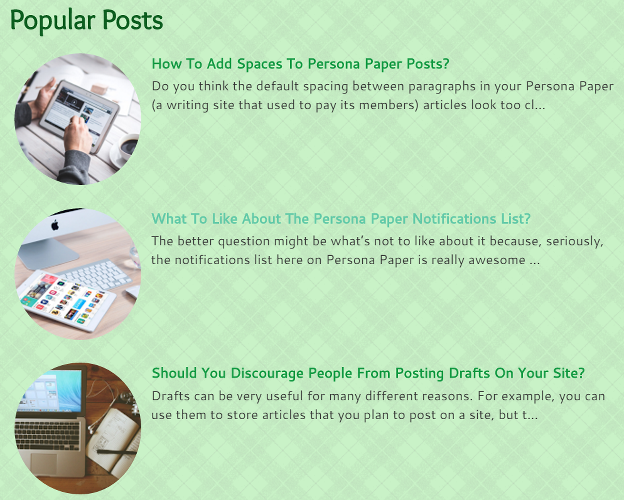
google blogger blog, writing sites meta, popular posts gadget, widget, blogging theme, template

  • Fixed up the Feedburner widget since the default version doesn't look all that inviting

Update: currently, all my Google Blogger blogs have a subscribe to Feedburner widget that opens in a modal. Here's a screenshot from the Movies Meta blog:

google blogger blog, subscribe via email, google feedburner, widget, gadget, movies meta, blogging theme, template, modal

  • 3-column footer and copyright/credits section

Update: changed my mind and decided to go with just 2 columns.

  • Fixed navbar with blog title and pages links including search

Update: No more fixed navbar for any of my Blogger blogs. Have decided to go with a different layout.


Update: search now opens in a popover except with the Anime Archives (Anime Meta) blog. Said blog's got a full screen search instead.

  • I like the automatic drop-down effect on hover so have that for the categories list on the fixed navabr

Update: since there's no more fixed navbar, there's also no more automatic drop-down on hover.

  • Fixed floating social media sharing buttons - they're on a fixed footer bar alongside other buttons like the back to top button, subscribe to the RSS icon, etc

Update: Some of my Tumblr themes still have this feature, but it's a different story for my Blogger blogs. For instance, the social media sharing buttons on Anime Archives opens in a modal.

  • When the user scrolls down a bit, the fixed footer bar shows up. If the user is on a post page, the social media share icons will also show up on the footer bar. Otherwise, only the back to top button and other icons will show up on the footer bar

Update: there's still a fixed footer bar and a back to top button, but no more social media sharing buttons on said bar

  • And more

Update: yup, there's a whole lot more features. LOL.

'Course, there's still lots that needs to be done, but, hopefully, can finish it all up soon. Right now, am working on the appearance of the posts on the homepage.

Update: Finished working on the Writing Archives, Anime Archives, Movies Meta, Blogging Sites Meta, and Writing Sites Meta blogs, but am currently still working on a few other blogs.

Already have an automatic read more link (in button format) plus short snippet, but also wanted to show a thumbnail.

  • What's supposed to happen is that, if there's an image in the post, it will show up on the homepage right above the snippet and read more button. This is regardless of where the image is located inside the post
  • The thumbnail was too small though, so I enlarged it
  • It looks sort-of okay, but still need/want to fix it up some more
  • See, the pic is responsive, but, on bigger screens/devices, it looks stretched
  • It's not pixelated, so it can still be seen clearly, and, technically, I could maybe leave it as-is, but I don't want to
  • The stretched look is annoying me. Want/need to fix it some more. LOL.

Update: got this issue sorted out. No more stretched-looking images.

And that's all for now. There's more, am sure of it, but, yeah, will talk about it some more later on. Hope everyone is doing well. How's the traffic / activity here on Persona Paper?

The last time I was here, it seemed kind of low, but, just checked my bank now, and I seem to have acquired a few coins or so, which is great, of course 😊.

Your Thoughts and Opinions

How 'bout you guys? How's it going? Feel free and welcome to share your thoughts and opinions by leaving a comment below.

*Notes:
- First image is by kaboompics (Public Domain) from Pixabay
- This was previously published elsewhere on Monday, November 14, 2016 at 11:34 AM

Google Blogger Blog Tag Issue Is A Bug

Saturday, January 26, 2019
I don't know if I should be happy about this or not. On one hand, now that I know it is a bug, well, it obviously can't be fixed, so, at least you don't have to waste your time trying to, right?

On the other hand, well, this bug is annoying, you know? What if it really kind of bothers you and you want it fixed?

google blogger, blog, blogging platform, tags, labels, widget, gadget, page

What's Going on With Google Blogger?

A few days ago, I wrote this post on Persona Paper. It's about the tag issue or problem that I've been experiencing in my Google Blogger blog.

Tag Issues

Basically, this is what happens:

  • Write a blog post and then add tags to this post
  • Publish the post and then click on any one of the tags
  • Doing so will take you to a page, which will list all of the articles that use said tag
  • You can set the number of articles that will appear per page, so, if, say, you have yours set to a minimum of 3, only 3 articles should show up every time you decide to look at a tag page
  • If there are more articles, a "next page" or "older posts" button should show up
  • If there are no more articles, then the aforementioned button should not show up
  • The problem is that the button shows up even if there are no more articles to display
  • So, for example, you only have one article that uses the "Google Blogger" tag
  • If you click on this tag, only one article should show up and the "older posts" button should not be displayed
  • However, what happens is that this button gets displayed even if there are no more posts

google blogger, blog, tags, labels gadget, widget, older posts, articles, page, blogging platform

The image above is a screenshot of part of the Google Blogger blog that I'm working on. See that "older posts" button?

If a tag only has 1 post to display, then that button shouldn't show up. The Google Blogger bug makes it so that this button appears even when it shouldn't. Have you noticed this too?

Tag Issue Happens on Unmodified Blog Using Default Google Blogger Template

It's very annoying, to say the least. After doing a bit more trial-and-error, I decided to check out another Google Blogger blog to see how the tags are displayed.

This blog hadn't been modified/edited/customized, and it currently uses the default Blogger template (since I haven't gotten 'round to fixing it up yet), so I wanted to compare the 2 and see where the problem might be.

To my surprise, I saw that the unmodified and default Blogger template was also displaying the same problem.

Tag Problem on Other Google Blogger Blogs

I then decided to check other Blogger blogs. I've only checked a few that weren't mine, and it looks like they have the same problem with the tags. So it really looks like this is a bug with Google Blogger.

Is This Happening With Your Google Blogger Blog?

Have you noticed this with your blog/s? It's really kind of annoying, but, on the plus side, at least I can now move on from this issue and focus on the other things that I still need to fix with my blog.

Right now, I'm checking the theme's responsiveness. How 'bout you? How you doin' with your blogs?

*Notes:
- Image is by FirmBee (Public Domain) from Pixabay
- This was previously published elsewhere on Saturday, October 15, 2016 at 11:29 AM

Tag Issues On Google Blogger Blog

Monday, January 21, 2019
So, I mentioned that I was currently working on a Google Blogger blog. I'm really quite pleased to say that I'm almost done fixing it up.

tags, labels gadget, widget, google blogger, blogging platforms, theme

Unfortunately, there are still a few more issues that I have to deal with. What a hassle, huh? LOL. One of the issues that I have to deal with is with the:

Tags


  • On Google Blogger, this is the Labels widget or gadget
  • When you click on a tag, you should be taken to a page which shows all the articles that use that tag
  • This feature works on my blog, so what's the problem then?
  • The issue is with the number of articles that show up
  • I had it showing only one post at first so I can see the look of my next-previous pagination buttons (definitely no infinite scroll anywhere on this blog. LOL)
  • After fixing the look of those buttons, I made it so that only a few tags at a time will show up per page
  • On some tags, this works perfectly, but, on other tags, for some unknown reason, the "older posts" button shows up even though it shouldn't because there are no more articles to display
  • Basically, that button shouldn't even be present on these tags since there's like only one post with said tag
  • Yeah, I've no idea what's up with that 😕

It's really kind of annoying, not to mention a hassle, since I either have to fix it or find some way to get around it. The weird thing is that this is only happening on some tags.

Well, hopefully, I can get this sorted out soon, or maybe I should just let it go? I don't want to though. LOL. We'll see 😊. So, how 'bout y'all? Hope your blogs are all doing well.

Edited to add: by now, I've finished working on this Google Blogger blog theme. I've been able to make 3 different themes. I also got to set up a few blogs on this platform. You can check out a list here.

*Notes:
- Image is by hayashinomura (CC:BY-SA) from deviantArt
- This was previously published elsewhere on Sunday, October 9, 2016 at 11:28 AM

Revisiting My WordPress Blog

Wednesday, January 16, 2019
It's been such a long time since I last logged on to my WordPress.com account that I'd practically forgotten that I actually had a blog there.

When I logged on, I saw that my last post was way back in 2015. So, I wrote and published a new post to explain my long absence.

I don't know if I'll be able to post there regularly again, but I do want to. I also want to fix up a lot of things there like the Portfolio page I'd been working on.

I hadn't been able to finish it back then and, now, since so much time has passed, a lot of things have already changed.

WordPress, WordPress.com, blog, portfolio, Tumblr, daily two cents, writedge, bubblews, blogging platform, updates

For instance, that page still has info regarding my articles on Bubblews, but that site has long since been gone. There's also info about some of my posts on Writedge and Daily Two Cents, but I've long since removed my articles from those 2 writing sites.

As another example, consider the pics on said portfolio page, particularly the ones that talk about my Tumblr blogs. Those pics show what my blogs used to look like back when I was using a different theme and layout.

In short, I really want to fix up said page though I don't know when I'll have the time to do so since I've been really busy lately.

If it's possible, I wanted to keep the old and obsolete Portfolio page and just start a new one. After all, I did spend all that time working on it. I don't want to just delete it. That, and looking at it brings back memories, you know?

So much has changed since then and it would be nice to compare and contrast the old and new portfolio pages. Of course, that's assuming I ever get around to finishing the new one I wanted to do. Haven't even been able to start yet. Soon, I'll be able to., I hope. Wish me luck. 😊

*Notes:
- Image is by 27707 (Public Domain) from Pixabay
- This was previously published elsewhere on Saturday, January 7, 2017 at 11:43 AM

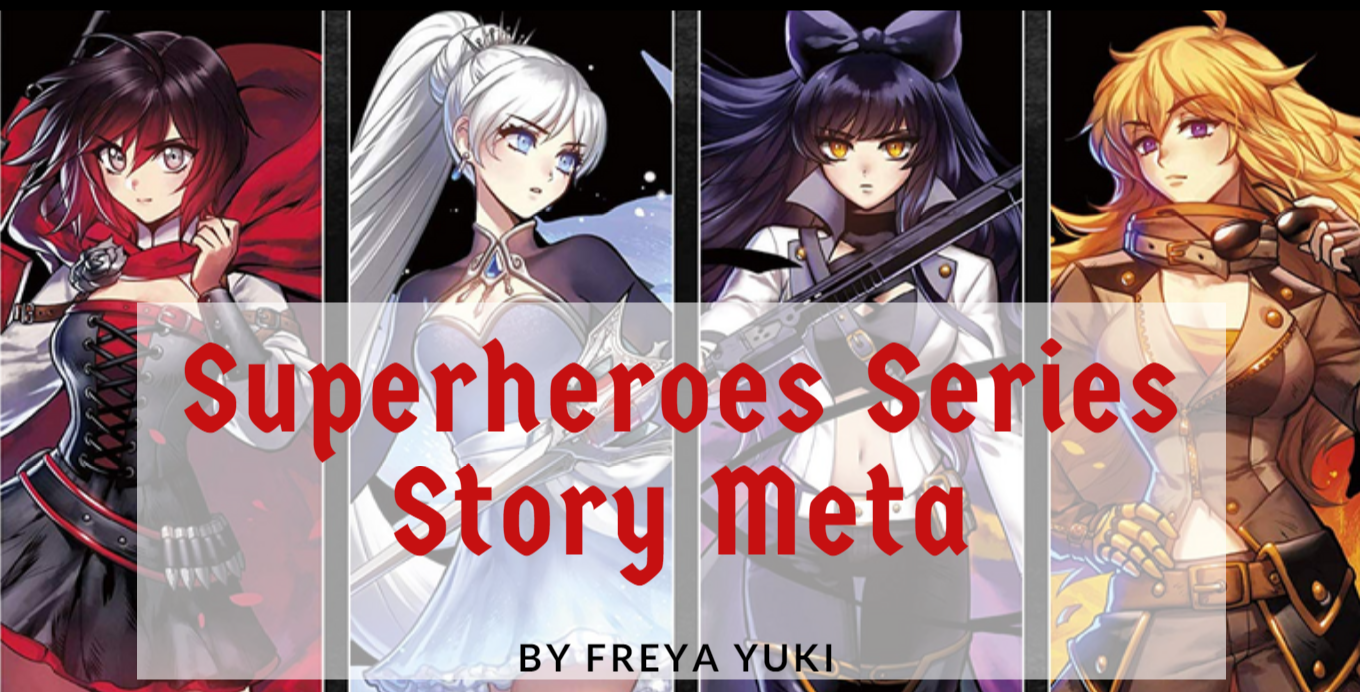
Superheroes Series Story Meta

Thursday, November 08, 2018
Also known as "Origins of the Superheroes Series Story".

The Superheroes Series is an ongoing series of short stories featuring the adventures of 4 superheroes currently only known by the names East, West, North, and South.

meta, writing meta, writing, stories, superheroes series, writing stories, rwby, Ruby Rose, Weiss Schnee, Blake Belladonna, Yang Xiao Long, short stories

Moving the Superheroes Series

It's been years since I first started writing this series. If I remember correctly, I first started posting this on the now-defunct site Bubblews. When Bubblews shut down, I transferred the posts to Persona Paper and Daily Two Cents.

Finding a New Home for the Superheroes Series

Persona Paper is still online, but it has discontinued its paying model, and there's talk of it shutting down, so I removed all my posts from that site.

Daily Two Cents has changed its payment model from a pay-per-view to Google AdSense. That, and the fact that both earnings and traffic have begun to fall from said site had me moving my posts elsewhere.

Writing Archives Google Blogger Blog

I decided to create a writing blog where I could post all my writings, short stories, philosophical musings, and anything else that was related to writing.

This included the Superheroes Series. Now all the posts related to said series can be found on this blog instead of being scattered across different sites.

Reason for Short Length

The Superheroes Series of posts are all pretty short. At most, they're only a few hundred characters long. The reason for this is because of where I first published this series.

meta, writing meta, writing, stories, superheroes series, writing stories, rwby, Ruby Rose, Weiss Schnee, Blake Belladonna, Yang Xiao Long, short stories

Instead of a minimum word count, Bubblews enforced a minimum character count. If I remember correctly, the site had a minimum character count of 400.

Usually, I did end up writing more than that, like with my Harry Potter Plotholes articles, which I've now moved to my Harry Potter Archives blog on Tumblr.

Experimenting With Different Writing Styles

The Superheroes Series began as an experiment. I wanted to try out different forms and styles of writing. So I ended up with articles that have or that contain:


The very first Superheroes Series post was dialog-only. Over time, I ended up writing it in third person using a mixture of dialog and description.

A Oneshot That Evolved

The first few parts of the Superheroes Series was about the Lover's Quarrel between East and West as told through dialog by North and South. It was supposed to be a one-shot, something that was meant to be short and even a bit humorous.

But then the scene with the Evil Enemy featuring East and West as well as said Evil Enemy happened. After that, it was really supposed to be the end. Really, seriously.

meta, writing meta, writing, stories, superheroes series, writing stories, rwby, Ruby Rose, Weiss Schnee, Blake Belladonna, Yang Xiao Long, short stories

But then, somewhere along the way, I was inspired to write more about these characters. The latest Lover's Quarrel between East and West developed a bigger plot, one that involved more than just the main characters.

Incorporating Some Tropes

While writing parts of the Superheroes Series, I also ended up reading some TV Tropes. As a result, there are quite a number of references to said tropes in parts of the series. The more genre-savvy readers might be able to tell what these tropes are.

No Gender Specified

Some might also notice that no gender has been specified for the main characters of the Superheroes Series. The main characters are referred to either by their names, which are also gender-neutral, or by using "their" and variations thereof.

This was done completely deliberately. In the beginning, this was mostly because I had yet to decide the genders of these characters.

Also, since this began as a dialog-only post, I couldn't really explicitly specify the genders of the main characters on said posts.

Then, when the series was expanded and got more of a plot, I decided that readers could decide the gender of these characters for themselves. Maybe this will change later on, but, for now, this is how it is.

Superheroes Series on Hiatus

Currently, the Superheroes Series is on hiatus. There are a variety of reasons for this, such as working on:


But, basically, it all really just boils down to one thing - lack of time. It's unfortunate, but, with so many things to do, there just isn't enough time to do it all. Sigh.

I do have some drafts and stuff plotted out for this series. I've got some stuff written down on what's supposed to happen next, but nothing is set in stone. I'm still not sure if some scenes will change or if other things should happen.

Anyway, hopefully, I'll be able to get back to this series soon. Wish me luck. And feel free and welcome to let me know what you think about all this by leaving a comment below 😃.

*Notes:
- All images are from Amazon.com; links shown below. Pics are meant to represent any of the 4 superheroes
- Image with added text was modified by Freya Yuki using Canva
- First pic is RWBY wall poster
- Second pic is Ruby Rose printed on canvas, framed poster
- Third pic is Weiss Schnee printed on canvas, framed poster